
Review your agent's work
Let an agent draft, review it with comments in the web app, and have the agent work through your feedback thread by thread.
The fastest way to get good work out of an agent is the same as with a person: let it draft, mark up the draft, and send it back. In Treehouse the whole loop happens on the file itself. You comment in the web app; the agent reads your comments, revises the file, replies to each thread and resolves the ones it fixed.
1. Ask for a draft with a status
Ask the agent to write the draft and mark it for review in its front matter:
Draft a launch announcement for the new pricing in Marketing/announcements/,
based on Specs/pricing/README.md. Set status: review in the front matter when
it's ready, and tell me the file name.
A status: key isn't something Treehouse acts on. It's a convention, and a useful one: it tells people and other agents what state a file is in. If you use it, write the allowed values into your AGENTS.md (for example, draft, review, final) and add a rule that only a person sets final.
2. Review it in the web app
Open the file and comment the way you would on any document:
- Select the text you want to change and choose Comment, or use ⊕ in the margin to comment on a whole block.
- Say what you want, not just what's wrong. "Too long, cut to two sentences and lead with the price" gets a better revision than "too long".
- Post each point as its own thread, so the agent can resolve them one at a time.
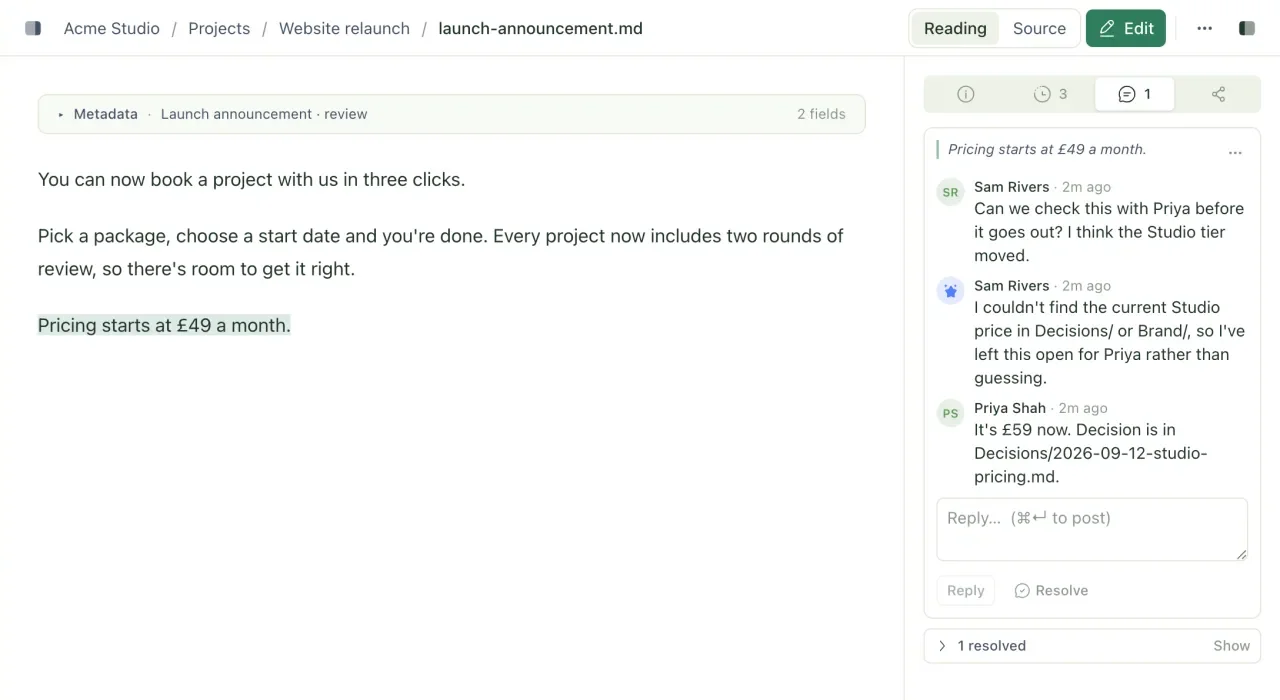
3. Send it back
Ask the agent to work through the feedback:
Address the open comments on Marketing/announcements/pricing-launch.md.
Reply to each thread with what you changed. Only resolve the ones you fixed;
if you disagree or need something from me, reply and leave it open.
Behind the scenes the agent lists the open threads, reads the file, writes its revision against the version it read, then replies to and resolves each thread. Because it writes against a specific version, it can't overwrite an edit you made while it was working; that would become a conflicted copy instead.
4. Check the revision
- Open the file. A banner shows it was Updated since you last looked; select See what changed to see the words the agent added and removed.
- Open the Comments tab. Resolved threads show who resolved them and at which version. Open ones are waiting on you.
- If a revision went wrong, open History and restore the earlier version.
Repeat until it's right, then set status: final yourself.
Taking it further
- Let the agent ask questions. Tell it in
AGENTS.mdto use comments for anything it's unsure about, quoting the passage in question. You'll find its questions in the margin, next to the text they're about. - Review someone else's draft. Ask an agent to review a teammate's document and leave its suggestions as comments rather than editing the file. The author stays in control of what changes.
- Get sign-off from outside. For a client or stakeholder who isn't a member, share a link pinned to the version you're happy with. They see exactly that version, even if the file changes afterwards.
Related
- Comment on a document
Leave comments on passages of a markdown file, reply and resolve threads, and let agents read and act on your feedback.
- See and restore earlier versions
Look through every change to a file, see who made it, view or restore an older version, and catch up on what changed while you were away.
- Connect Claude Code
Give Claude Code access to a workspace through your synced folder, the Treehouse MCP server, or both.
Last updated