
Set up a workspace with an agent
Hand a new, empty workspace to an agent. It interviews you, proposes a structure and builds it once you agree.
Every new workspace comes with a setup guide for agents, in a file called AGENTS.md at its root. You don't have to follow it yourself: point an agent at the workspace, say "Set up this workspace", and it does the rest with you.
Steps
- Open your new workspace in the web app. While a workspace is still empty (two files or fewer, and no folders), its front page and your dashboard show a card called Let an agent set this up.
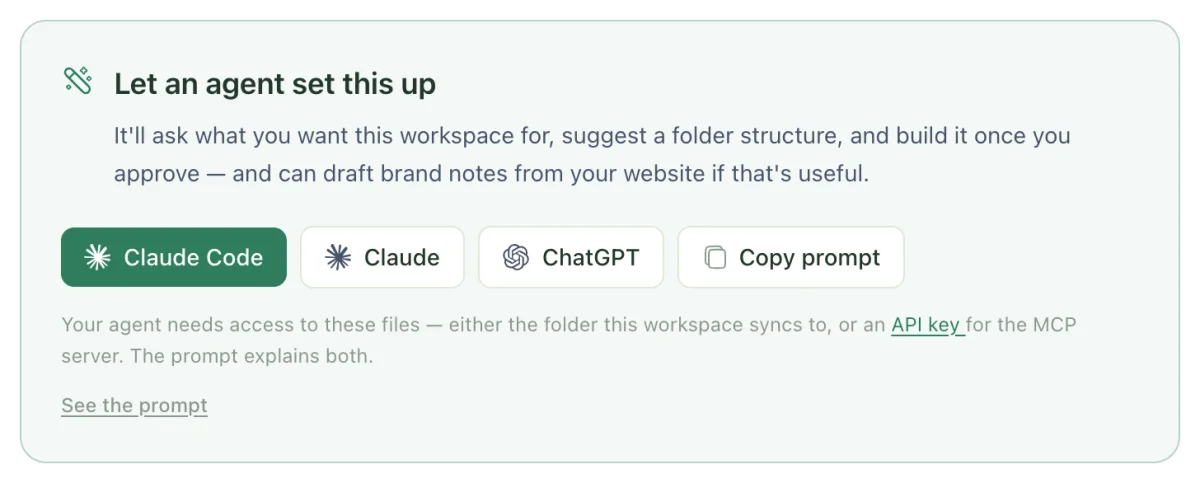
- Choose where to send it:
- Claude Code opens Claude Code with the setup prompt already filled in.
- Claude or ChatGPT opens a new chat with the prompt.
- Copy prompt copies it, to paste into any other agent. See the prompt shows it first.
- Answer the agent's questions. It wants to know what the workspace is for, who will read it, what you'll put in first, and whether there's a website or public presence behind it.
- Review the folder structure it proposes. Ask for changes until it looks right. It won't create anything until you say yes.
- Say yes. The agent creates the folders and writes a
README.mdin each one explaining what belongs there. - If the workspace is for a company or client work, the agent offers to read your website and draft starting notes on your positioning, tone of voice and products. Accept or skip.
- When you're happy, let the agent finish up. It rewrites the root
README.mdas a real front page and replacesAGENTS.mdwith the rules for this workspace.
You can do the same thing without the card: open the synced folder in your agent and say "Set up this workspace."
What the agent offers
The setup guide gives the agent four starting points, which it adapts to your answers and trims to what you'll actually use:
| For | Starting folders |
|---|---|
| A company knowledge base | Inbox, Brand, Product, People, Customers, Operations, Meetings |
| A personal second brain | Inbox, Notes, Projects, Areas, Resources, Journal |
| Client work | Inbox, Clients (a folder per client with Brief, Deliverables and Notes), Brand, Proposals, Templates |
| A single project | Inbox, Docs, Decisions, Research, Meetings |
Every structure starts with an Inbox: somewhere to drop anything without deciding where it goes. The agent writes filing rules into Inbox/README.md so it (or another agent) can sort the Inbox later. Run an inbox your agent files explains how to keep it moving.
Dated folders like Meetings and Journal are set up to open as a calendar.
Check it worked
- Every top-level folder has a
README.mdthat says what it's for. - The root
AGENTS.mdno longer reads like a setup guide. It describes your workspace: its folders, naming and conventions. - Any notes the agent drafted from your website are marked
status: draftand list theirsources:. Read them before you rely on them.
Troubleshooting
The card isn't showing
It only appears while the workspace has two files or fewer and no folders. Once you've added anything else, open your agent in the synced folder, or connect it over MCP, and say "Set up this workspace" instead.
My agent says setup has already happened
The guide tells agents to stop if the workspace already has a real structure, rather than rebuilding it. If you want a fresh start, say so explicitly, or tell the agent what you'd like changed.
The Claude Code button doesn't open anything
The button needs Claude Code installed on this computer. It's also left out when the prompt is too long to pass through a link. Use Copy prompt and paste it into Claude Code yourself.
Related
- Shape your workspace
Folder structures that work for people and agents alike, and the handful of habits that keep a workspace easy to navigate as it grows.
- Write your AGENTS.md
The one file every agent reads first. What to put in it so any agent, in any session, works the way your team does.
- Run an inbox your agent files
Drop anything into Inbox/ without deciding where it goes, and have an agent file it by rules you write once.
Last updated